Featured

Deploy OpenClaw in 60 seconds — 20% off logoDeploy OpenClaw in 60 seconds — 20% off

Launch OpenClaw on Hostinger in about 60 seconds and keep your agent live 24/7. Our referral link gives you 20% off, no coupon code needed.

Launch on Hostinger
Run your Hermes agent on Hostinger, fully managed logoRun your Hermes agent on Hostinger, fully managed

Launch Hermes on Hostinger in one click, fully managed, no VPS knowledge needed. Use code ZACAARON10 for 10% off.

Launch on Hostinger
Crawl and scrape any site into clean data, 10% off logoCrawl and scrape any site into clean data, 10% off

Firecrawl crawls and scrapes any site into clean markdown for your agent. Get 1,000 free credits, and new users get 10% off their first purchase.

Try Firecrawl free
Your own AI agent, running 24/7 with QwikClaw logoYour own AI agent, running 24/7 with QwikClaw

QwikClaw sets up and runs an always-on OpenClaw agent for you. One click, no config files, no server setup.

Deploy now
One API to scrape, enrich, and extract the internet. logoOne API to scrape, enrich, and extract the internet.

Context.dev gives your agents a single API to scrape, enrich, and extract live web data — no proxies, no parsers, no maintenance.

Start building free
SetupClaw: done-for-you OpenClaw for founders & exec teams logoSetupClaw: done-for-you OpenClaw for founders & exec teams

White-glove OpenClaw for founders and exec teams (4–50+ employees): we install, harden, integrate your tools, and maintain it — secured from day one.

Get it set up for you
SEO data APIs for your agent, $1 free credit logoSEO data APIs for your agent, $1 free credit

DataForSEO gives your agent live access to SERP results, keyword data, backlinks, and on-page SEO data through one API. New accounts get a $1 credit, good for up to 20,000 keyword or backlink lookups.

Try DataForSEO free
Reach 47,000+ AI builders

A flat monthly placement in front of developers actively installing AI tools. No lock-in, cancel anytime.

Advertise here

Works with

Claude CodeClaude DesktopCursorVS CodeClineCodex CLIOpenClaw+ any MCP client

Install to Claude Code

This server doesn't publish a one-line install command. Follow the setup in the source repository.

Summary

MCP server for YApi integration that generates TypeScript types, mock data, and API request code.

README.md

YApi MCP Server

这是一个 Model Context Protocol (MCP) 服务器,用于与 YApi 接口管理平台集成,支持自动生成 TypeScript 类型定义、Mock 数据和 API 请求代码。

✨ 功能特性

🔧 核心功能

  • 配置文件读取: 自动读取项目中的 yapi.config.json 配置文件
  • YApi 数据获取: 通过配置的 remoteUrl 获取 YApi 项目的完整接口信息(支持缓存)
  • TypeScript 类型生成: 根据接口响应 Schema 自动生成 TypeScript interface 定义
  • Mock 数据生成: 智能生成符合接口结构的 Mock 测试数据
  • API 请求代码生成: 自动生成 Axios 或 Fetch 风格的 API 请求函数
  • 智能缓存机制: 自动缓存 YApi 数据 30 分钟,减少网络请求

特别说明(强烈推荐!!!)

推荐使用最新的yapi-cli, 相比当前项目支持了以下功能:

  • 支持 cli
  • 支持 mcp
  • 支持 skill
  • 支持多 yapi 项目和多 yapi 空间,配置更方便
  • 改用 yapiopenapi 接口获取,减少上下文占用,更省 token了

✨ 快速开始

1. cursor 中安装 yapi-mcp-server

{
	"mcpServers": {
		"yapi-mcp": {
			"command": "npx",
			"args": ["-y", "@vtian/yapi-mcp-server", "--stdio"]
		}
	}
}

2. 获取 yapi 参数

!yapi设置

3. 项目中配置 yapi.config.json

在您的前端项目根目录下创建 yapi.config.json 文件:

{
	"remoteUrl": "https://your-yapi-domain.com/api/open/plugin/export-full?type=json&pid=1437&status=all&token=your-token",
	"type": "yapi",
	"dataKey": "data",
	"mockPath": "src/mocks",
	"typePath": "src/types",
	"apiPath": "src/api"
}

必填字段

  • remoteUrl: YApi 项目导出接口 URL
  • type: 平台类型,固定为 "yapi"

可选字段

  • dataKey: 响应数据字段名,默认 "data"
  • mockPath: Mock 文件输出路径,默认 "src/mocks"
  • typePath: 类型文件输出路径,默认 "src/types"
  • apiPath: API 代码输出路径,默认 "src/api"

✨ 可用工具

本项目提供以下 5 个 MCP 工具,可以通过支持 MCP 协议的客户端(如 Claude Desktop、cursor)调用:

1️⃣ read_config - 读取配置文件

从项目中查找并读取 yapi.config.json 配置文件。

2️⃣ get_yapi_data - 获取 YApi 数据

从 YApi 服务器获取接口数据,支持缓存机制(30 分钟)。

3️⃣ generate_types - 生成 TypeScript 类型

根据接口 JSON Schema 生成 TypeScript 类型定义。

4️⃣ generate_mock_from_yapi - 生成 Mock 数据

根据接口 Schema 智能生成符合结构的 Mock 数据。

5️⃣ generate_api_code - 生成 API 请求代码

生成 Axios 或 Fetch 风格的 API 请求函数代码。

✨ prompt 使用

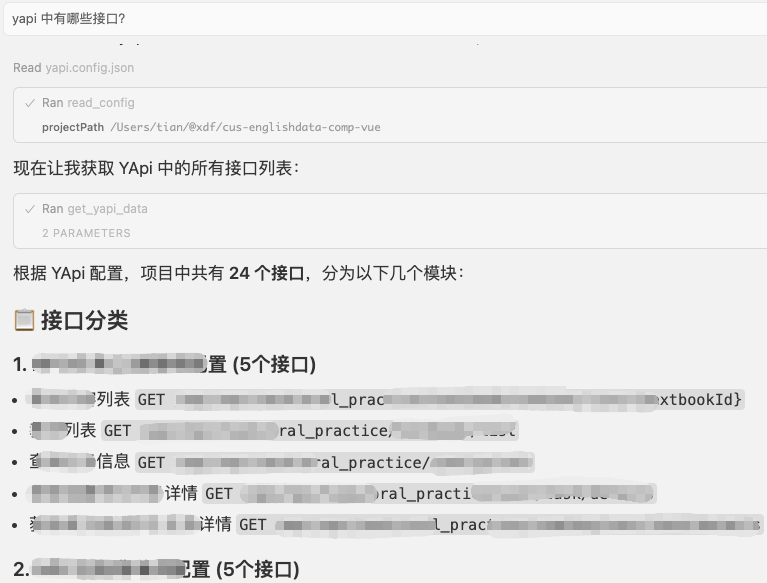
🔧 yapi 中有哪些接口?
![](https://cdn.jsdelivr.net/gh/tiandashu/yapi-mcp-server@main/docs/01.png)

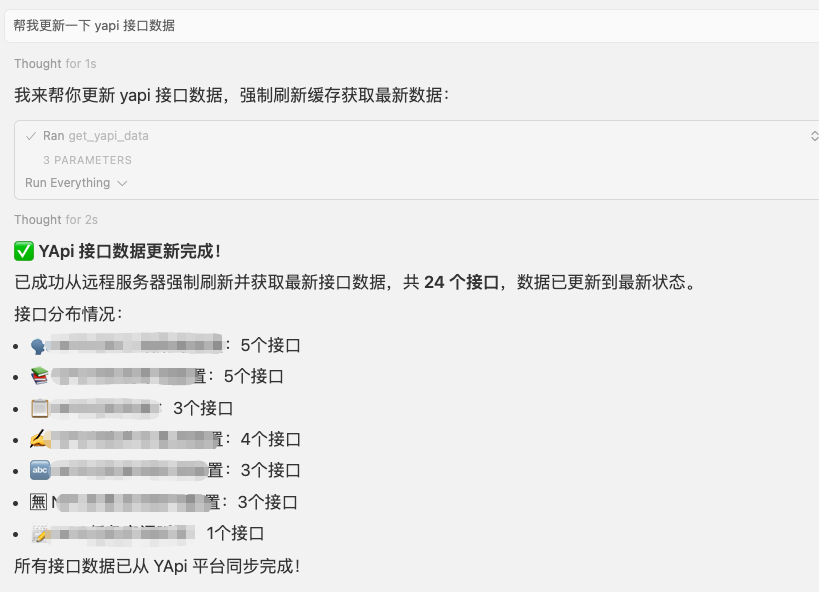
🔧 帮我更新一下 yapi 接口数据

![](https://cdn.jsdelivr.net/gh/tiandashu/yapi-mcp-server@main/docs/02.png)

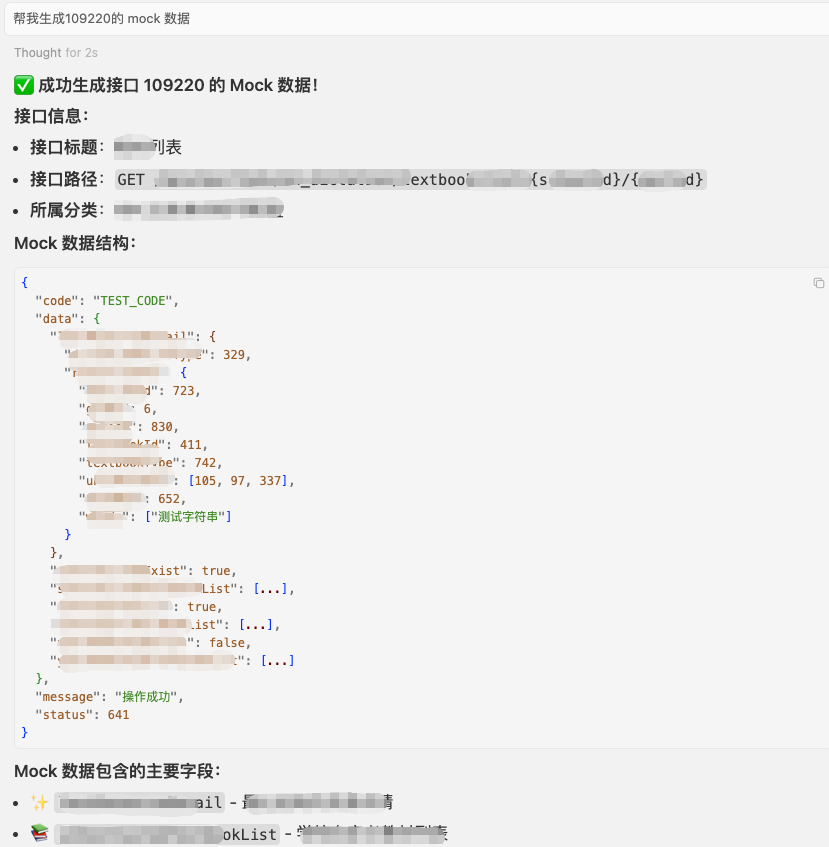
🔧 帮我生成 109220 的 mock 数据

  • 可以是 yapi 上接口对应的 id,也可以直接是接口名称

![](https://cdn.jsdelivr.net/gh/tiandashu/yapi-mcp-server@main/docs/03.png)

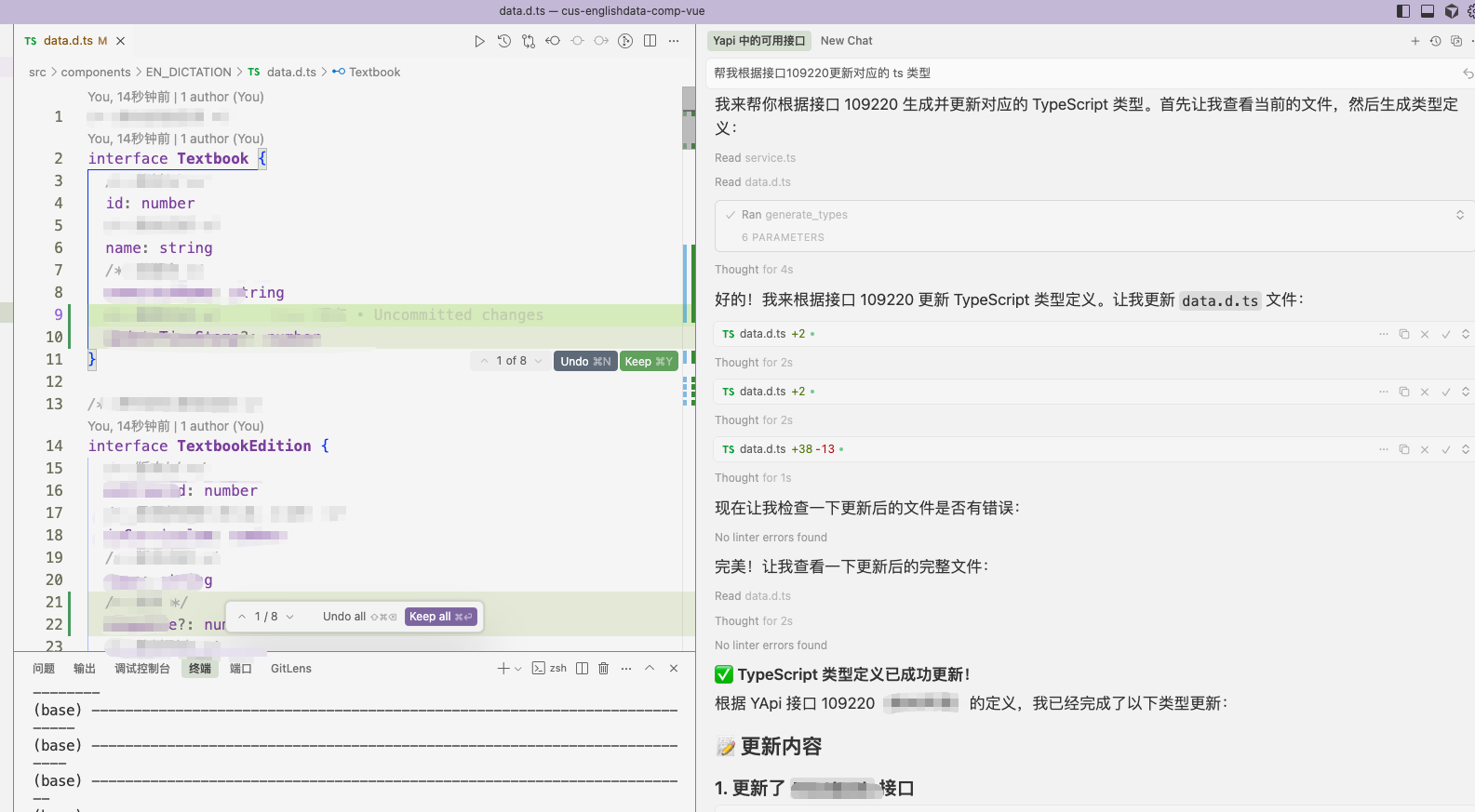
🔧 帮我根据接口 109220 更新对应的 ts 类型

  • 可以是 yapi 上接口对应的 id,也可以直接是接口名称

![](https://cdn.jsdelivr.net/gh/tiandashu/yapi-mcp-server@main/docs/04.png)

🔧 帮我根据接口 109220 生成 axios 代码

  • 效果同上

✨ 生成的文件示例

TypeScript 类型定义

/** 用户信息接口 */
export interface UserInfoData {
	/** 用户ID */
	userId: number
	/** 用户名 */
	username: string
	/** 邮箱 */
	email: string
}

API 请求代码 (Axios)

/**
 * 用户信息接口
 */
export const getUserInfo = async (): Promise<UserInfoData> => {
	const response = await axios.get('/api/user/info')
	return response.data
}

Mock 数据

{
	"code": "200",
	"success": true,
	"message": "操作成功",
	"data": {
		"userId": 12345,
		"username": "测试用户",
		"email": "test@example.com"
	}
}

📄 许可证

MIT License

🤝 支持与反馈

如有问题或建议,请通过 Issues 或内部渠道联系开发团队。

See related servers & alternatives →

Related MCP servers

Browse all →

Related guides

Hand-picked reading to help you choose and use Developer Tools servers.